
SOS / crisis access
The red button in the top right corner of every screen is always one tap away, no matter where you are in the app.
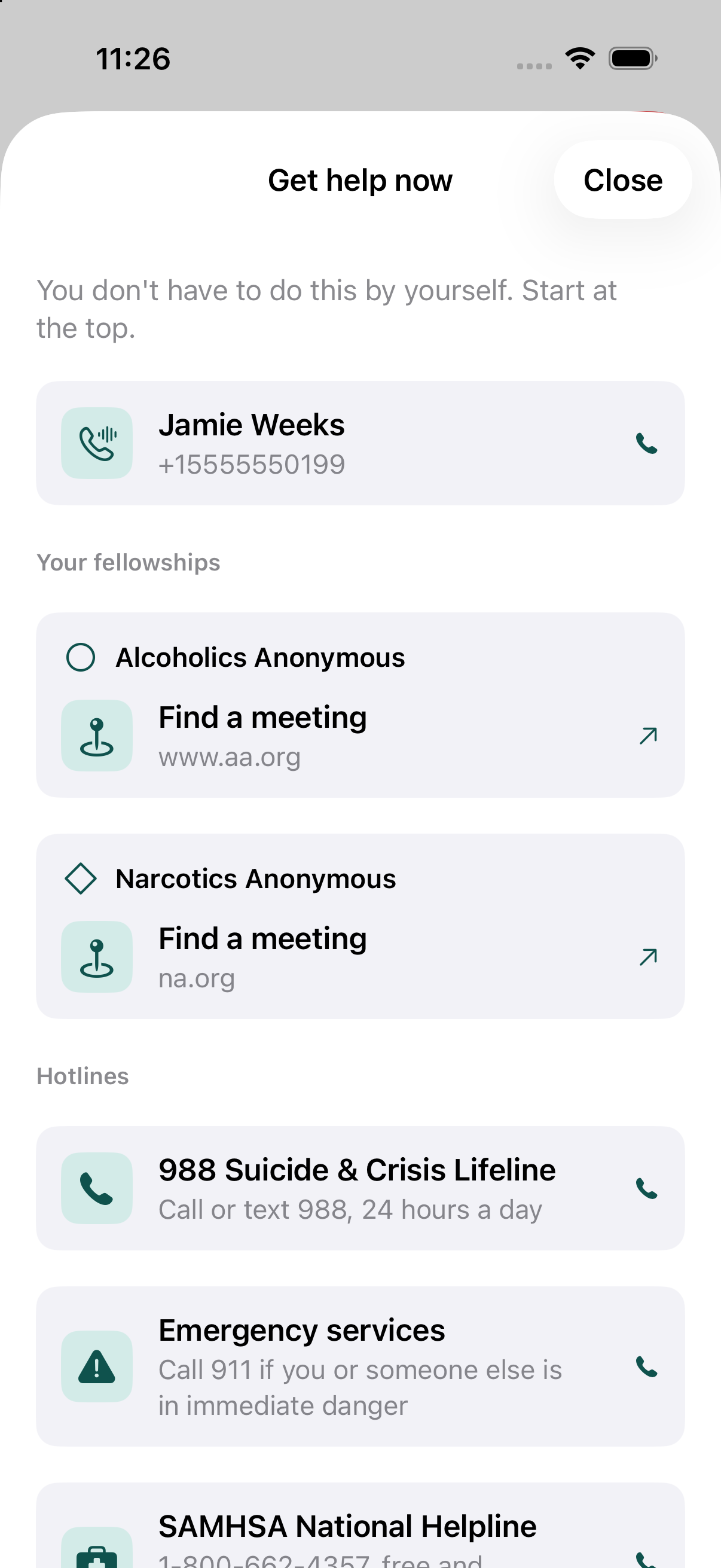
Tapping it opens your emergency contacts first, in the order you've set them. You manage that list from the same screen, with the small Add someone to call or Edit who's here button at the bottom.
Your fellowships
Below your contacts, each active fellowship you're in (AA, NA or Al-Anon, not a fellowship you've typed in yourself) gets its own card:
- Its real national hotline, if it has one. Only Al-Anon actually runs one; AA and NA don't, so nothing shows for either - the app never makes one up.
- A local hotline number, if you've entered one for that program in its own Settings screen. Typed in by hand, never looked up or suggested by the app - a wrong number matters more here than almost anywhere else.
- Find a meeting, always offered. Opens that fellowship's own official site in your browser. The app itself never asks for your location, here or anywhere else - if the site you land on wants it, that's a request the browser handles directly with you.
Cards appear in the same order as your programs everywhere else in the app - see Settings' "Primary fellowship" picker.
Hotlines
Below your fellowships: the 988 Suicide & Crisis Lifeline, 911, and the SAMHSA National Helpline. These are always shown, for everyone.
Frequently asked questions
What does the SOS button do?
One tap from any screen opens your emergency contacts in the order you've set them, then a card for each of your fellowships (a real national hotline where one exists, any local number you've entered, and a link to find a meeting), then 988, 911, and the SAMHSA National Helpline.